

One Scan: PDF Doc Scanner
Quick Info
App Details
One Scan turns your iPhone and iPad into a powerful AI scanner. Point, tap, done: documents, receipts, ID cards, books and photos become crisp, searchable PDFs in one tap. Then sign, edit, organize and share them in seconds.
Everything you expect from a top scanner app, without the clutter. No settings to fiddle with, no learning curve: One Scan does the hard work for you.
SCAN ANYTHING IN ONE TAP
- Automatic edge detection, perspective correction and shadow removal
- Batch mode: capture dozens of pages in a row and get a single multi-page PDF
- Smart filters: color, grayscale, black & white, whiteboard and auto-enhance
- Dedicated modes for documents, ID cards (front and back on one page), passports, business cards, books, receipts and photos
- Import from Photos, Files, Mail or any app with the Share Sheet
- Built-in QR code and barcode reader
AI THAT DOES THE BORING PART
- OCR text recognition in 100+ languages: copy, search and export the text of any scan
- AI summaries and instant answers: ask a question about a contract, an invoice or a report and get the answer
- Smart naming and auto-sorting: One Scan reads your document, names it and files it for you
- Data extraction: pull dates, totals and vendors from receipts and invoices, ready to export
- One-tap translation of scanned text
SIGN AND EDIT PDFS
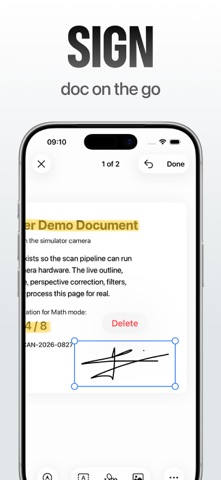
- Sign with your finger, Apple Pencil or a saved signature; add initials, dates and text fields
- Fill out forms, annotate, highlight, draw, add stamps and watermarks
- Reorder, rotate, delete, merge and split pages
- Compress files, choose the page size (A4, Letter…) and the margins
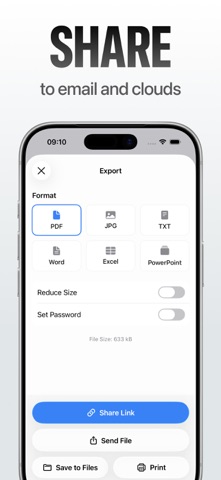
- Export as PDF, JPG, PNG, TXT or Word
ORGANIZE AND FIND EVERYTHING
- Folders, tags and favorites
- Full-text search inside your scans, powered by OCR
- iCloud sync keeps your library up to date on iPhone and iPad
- Save to Files, iCloud Drive, Google Drive, Dropbox or OneDrive
- Share by Mail, Messages, AirDrop or WhatsApp, or print with AirPrint
PRIVATE BY DESIGN
- Your scans are processed on your device and stay in your library. No account required
- Lock the app and individual documents with Face ID, Touch ID or a passcode
- Password-protect PDFs before you share them
- No ads, and we never sell your data
MADE FOR IPHONE AND IPAD
- Full iPad experience: Split View, drag and drop, keyboard shortcuts and Apple Pencil
- Home Screen widgets, Siri Shortcuts and a Files extension to scan from anywhere
- Optimized for the latest iOS and iPadOS
PERFECT FOR
Students, teachers, freelancers, small businesses, travelers and remote workers. Anyone who needs to scan contracts, receipts, notes, whiteboards, IDs or old family photos.
Terms of Use: https://mwm.ai/legal/scanner/terms-of-use
Privacy Policy: https://mwm.ai/legal/scanner/privacy-policy
Screenshots (6)



Editor Review
AI Tools Oasis Editorial Review of One Scan: PDF Doc Scanner
Drawbacks & Limitations:
- Noticeable data consumption when using cloud-based AI processing.
- Free version imposes limits on daily scans and some advanced features.
Recommendation: One Scan: PDF Doc Scanner is ideal for professionals, students, and business owners who need fast, high-quality scanning with advanced AI features. It particularly suits those seeking a comprehensive document management solution on their phone without complexity.
Official App Pricing & Plans
| Subscription Plan | Price (USD) | Features & Limits | Free Version |
|---|---|---|---|
| Free Plan | $0 Free | Limited basic features daily | Always available |
| Monthly / Pro Subscription | $4.99 - $9.99 / month | Unlimited access to all AI tools and ad-free | 3-7 day free trial |